W1seGuy CTF
8/24/20253 min read
My post content
import random
import socketserver
import socket, os
import string
flag = open('flag.txt','r').read().strip()
def send_message(server, message):
enc = message.encode()
server.send(enc)
def setup(server, key):
flag = 'THM{thisisafakeflag}'
xored = ""
for i in range(0,len(flag)):
xored += chr(ord(flag[i]) ^ ord(key[i%len(key)]))
hex_encoded = xored.encode().hex()
return hex_encoded
def start(server):
res = ''.join(random.choices(string.ascii_letters + string.digits, k=5))
key = str(res)
hex_encoded = setup(server, key)
send_message(server, "This XOR encoded text has flag 1: " + hex_encoded + "\n")
send_message(server,"What is the encryption key? ")
key_answer = server.recv(4096).decode().strip()
try:
if key_answer == key:
send_message(server, "Congrats! That is the correct key! Here is flag 2: " + flag + "\n")
server.close()
else:
send_message(server, 'Close but no cigar' + "\n")
server.close()
except:
send_message(server, "Something went wrong. Please try again. :)\n")
server.close()
class RequestHandler(socketserver.BaseRequestHandler):
def handle(self):
start(self.request)
if name == '__main__':
socketserver.ThreadingTCPServer.allow_reuse_address = True
server = socketserver.ThreadingTCPServer(('0.0.0.0', 1337), RequestHandler)
server.serve_forever()
Today I'd like to give you the guide for the newest task on TryHackMe, "W1seGuy." In order to capture the flags, this room requires a basic understanding of XOR encryption as well as some Brute Forcing/Trial and Error utilizing Python & CyberChef. Let's begin.
Downloading the Python Source Code, which is provided in Task 1, is the first step. The source code is displayed as follows:
It is clear from examining the source code that this code creates a server that tests users' ability to decode an XOR-encrypted communication. The server utilizes a random 5-character key that is generated when a client connects to XOR every letter of a hard coded flag (THM{thisisafakeflag}). In XOR encryption, the XOR bitwise operation is used to combine each character of the flag with its matching character of the key being encrypted (cycling over the key if the key is shorter than the flag). Following encryption, the message is transmitted to the client in hexadecimal format. After that, the client has to guess the encryption's random key; if they get it right, they get the original flag saved in a file.


As we can see, the application produced hexadecimal XOR-encoded text.
The most important lesson to learn from this is that TryHackMe consistently uses the flag format "THM{…}," thus we can be certain that the first four characters will be "THM{." In order to obtain the beginning letters of the encryption key, we can use CyberChef to first obtain the HexaDecimal counterpart of the plaintext "THM\" and then attempt to reverse the XOR operation.
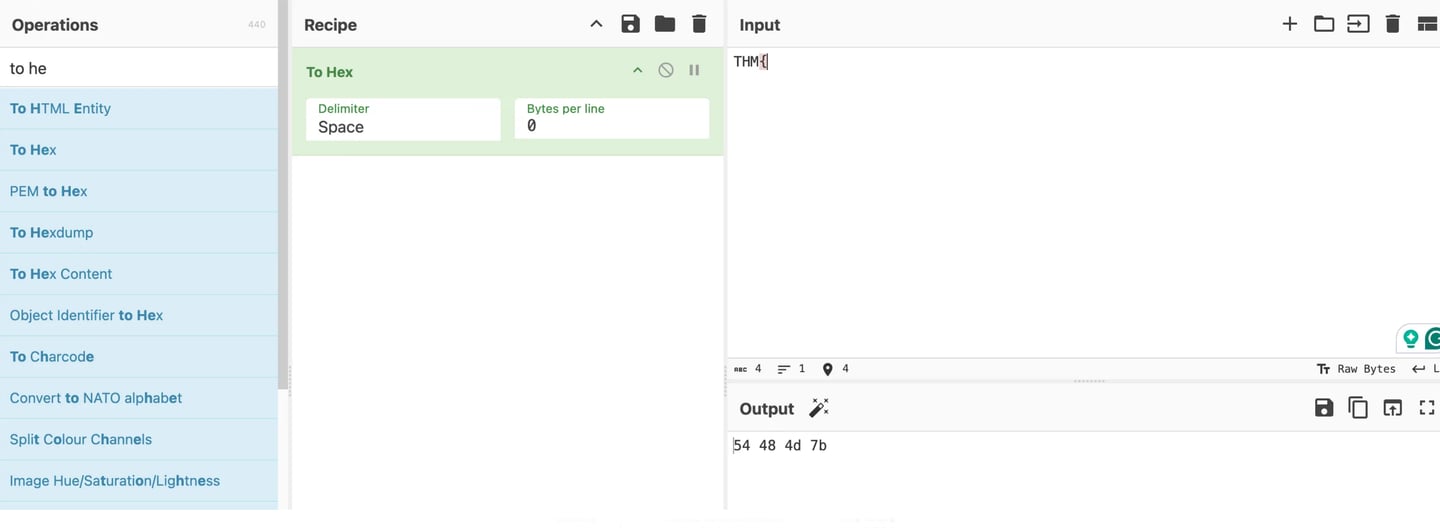
Therefore, we can now use the text we received to test the reverse XOR Approach. Since each character in "THM\" takes up one byte (8 bits) of the message, we will utilize the first four bytes of the created text as the key. Since these are the first four bytes of the XORed text, the key in my case, based on the message I received, would be "6c26293e." We now need to use the previously discovered key to determine what the original "THM{" corresponds to in XOR Encoded form. if we discover that we are aware of the encrypted key's first four hexadecimal characters. This is seen below.
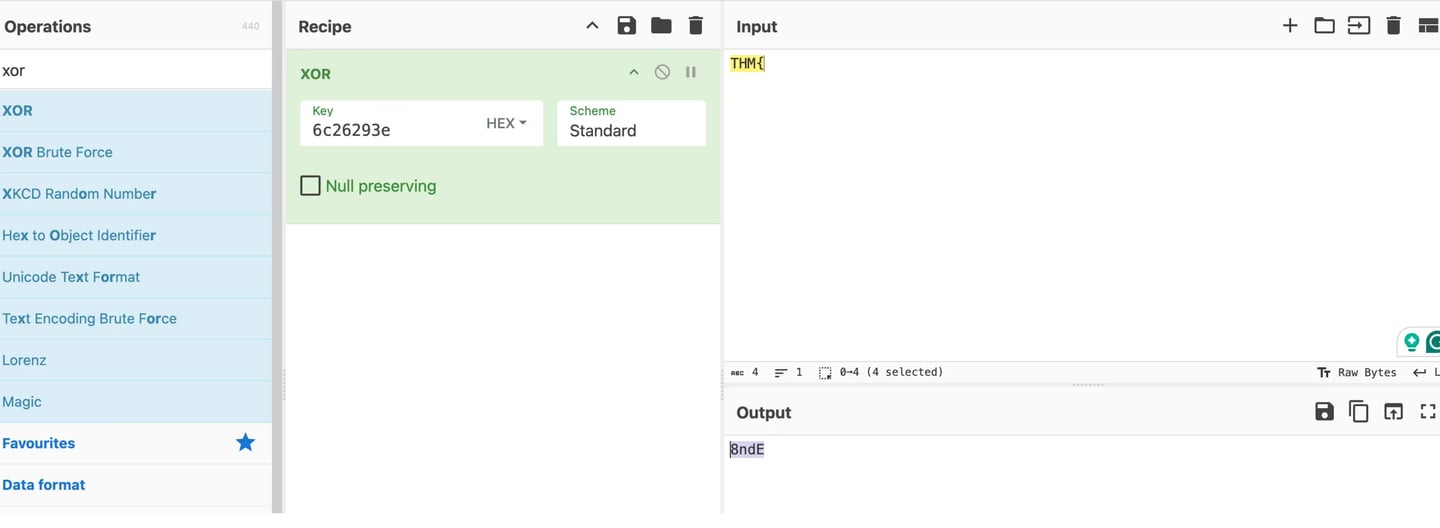
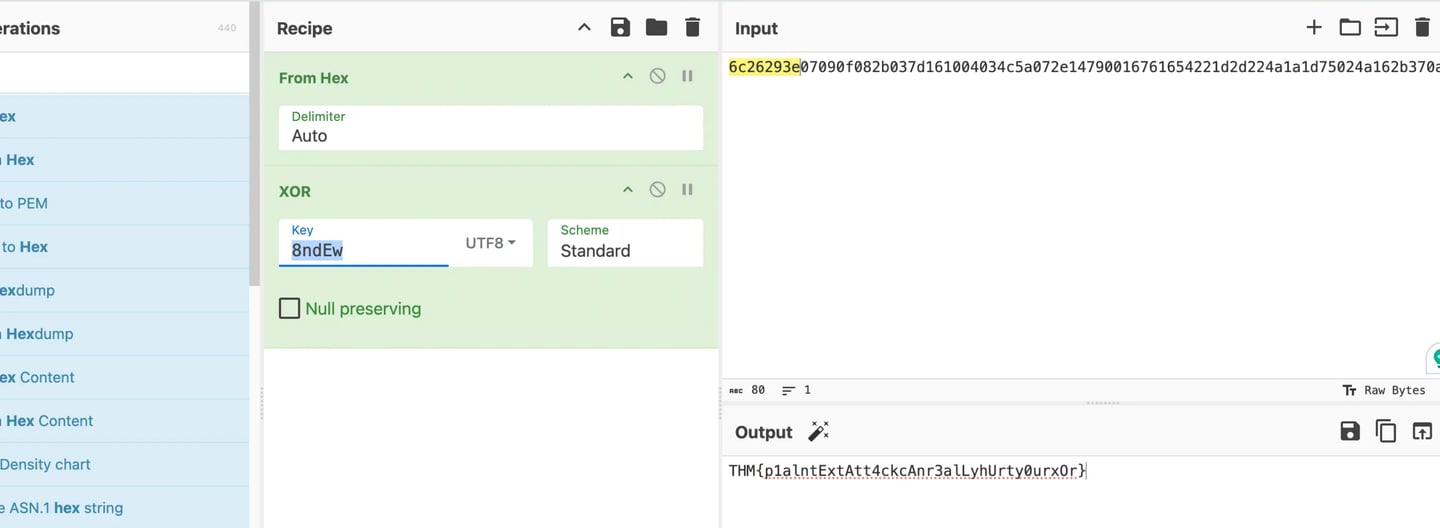
It is evident that the first four characters of the encrypted key, "THM{" and the key "6c26293e," equate to "8ndE." The original XOR text and the portion of the encrypted key that is displayed below must now be added. To reflect the reverse XORed output, I must add Hex and alter the XOR standard to UTF-8.
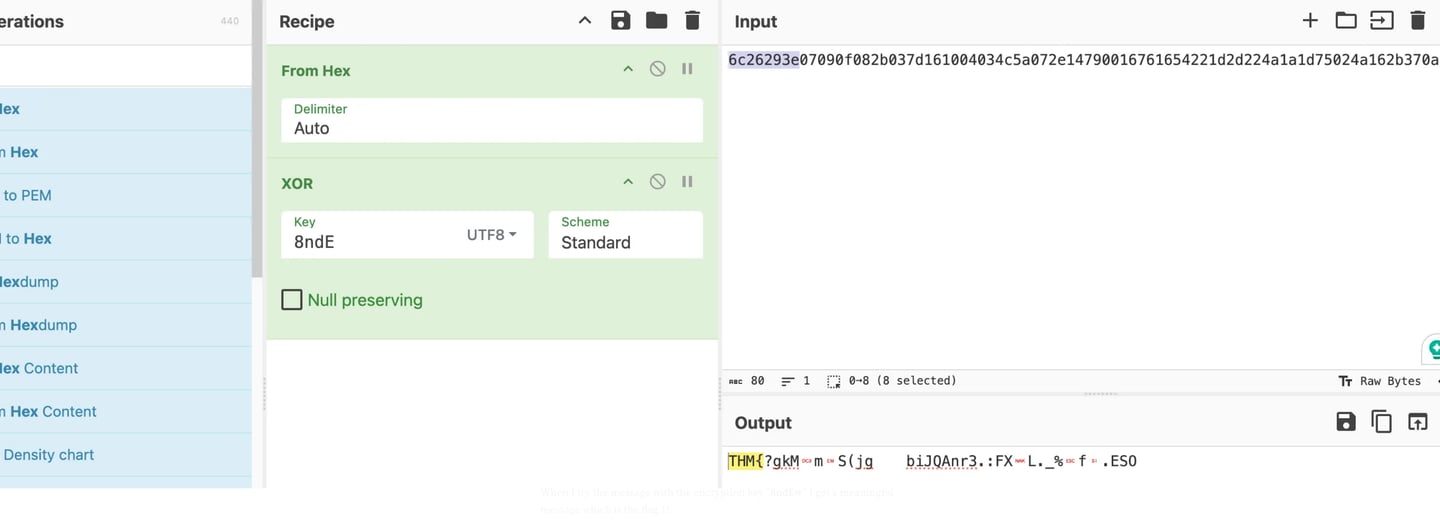
Using numbers and capital and lowercase letters as the source code, "res = ''," we can now attempt a brute forcing method on the encryption key. All numbers and capital and lowercase letters are mentioned in the line "join(random.choices(string.ascii_letters + string.digits, k=5))." We obtain Flag 1 through trial and error! I get a useful message—the flag 1—when I attempt to send the message using the encryption key "8ndEw."